Asset, Patch & Configuration Monitoring
ConsoleWorks automates the collection, comparison, alert/notification and auditing of any changes to configuration baselines, eliminating the majority of human errors and minimizing the impact of the intentional or unintentional erroneous activity.
Configuration monitoring or management is a way to reduce or eliminate security gaps resulting from cyber assets that are not properly configured. These gaps occur when baseline changes are not documented when required changes, such as security patches are not implemented when configuration changes are made without approval, and when configuration change mandates are not implemented on one or more cyber assets.
ConsoleWorks Asset, Patch & Configuration monitoring solution addresses key security regulations pertaining to notification of device configuration changes. It can be configured to monitor many items including:
- Functional settings that determine how the asset operates
- Versions of software currently installed including BIOS, firmware, operating system, applications, etc.
- Patches, including security patches that are installed
- Ports that are active and how they are configured
- Services that are enabled
- Accounts
- Configuration Files
While configuration information is not limited to this list, these are the primary information categories because they are an important part of determining the security of each asset.
The overriding purpose of configuration monitoring and management is to maintain cyber asset configurations at a known state that has the highest level of security.
Asset, Patch & Configuration Monitoring Features
Automation of the Asset Configuration Retrieval
ConsoleWorks captures, documents and secures the configuration data programmatically.
Establishing a Specific Configuration as the Baseline
Once the asset configuration is captured, it can be defined as the master or baseline configuration and used as the standard for which all other like asset configurations are compared.
Automating the Comparison of the Current Asset Configuration to the Baseline
ConsoleWorks automates the comparison and determines where differences exist.
Automated Patch Analysis
ConsoleWorks can be configured, via a schedule to perform patch analysis. Once the current patch state is gathered, ConsoleWorks can integrate with industry or custom solutions to assist in automating the patch gap analysis.
Automated Event Detection and Alerting of Unauthorized Changes
When a difference is detected, ConsoleWorks logs that a configuration check has occurred and differences were found. It subsequently Alerts the appropriate personnel of the differences.
Notification Sent to the Trouble Ticketing System
In addition to notifying appropriate personnel, ConsoleWorks can automate the generation of a trouble ticket to start the review or resolution process.
Manual Triggering or Scheduling of Configuration Checks
At any time a baseline check can be manually executed within ConsoleWorks.
Logging of Activity over the Entire Process for All Assets
ConsoleWorks understands who changed the asset configuration outside the approved process. Identifying the person that made a change provides the opportunity for training to ensure the process is followed in the future – or to take corrective actions if such is deemed necessary and appropriate.
Secure Logs for Compliance Reporting and Forensic History
Since all activity, down to the keystroke, is logged, proof of compliance is as simple as executing a report. The report not only includes the dates and times that the configuration checks were run, it also includes information on when differences were found and acknowledged.
History of Asset Configurations
ConsoleWorks maintains a history of configuration baselines. Configuration checks can be executed on any of the saved configurations.
Automated Patch Analysis Process
NERC CIP-007-6 / R2 requires a patch management process for tracking, evaluating, and installing cybersecurity patches for applicable Cyber Assets, including device drivers. Many utilities see this is a grueling task, requiring many, many man-hours to meet the “every 35-day analysis” required by NERC CIP.
The ConsoleWorks Automated Patch Analysis solution greatly simplifies the process of gathering the information required for patching IT and OT devices – beyond the HMI.
Datasheet
Automated Process
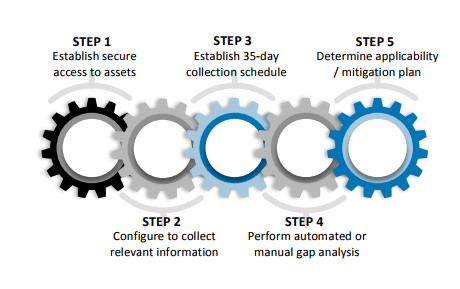
- Establish Secure Access to Assets
ConsoleWorks is configured to access all devices, beyond the HMI, without the need for an agent. - Configure to Collect Appropriate Information
Once ConsoleWorks has been configured to access the devices, it has knowledge of the OT devices and methods to collect the information. - Initiate 35-Day Analysis Schedule
ConsoleWorks is configured via a scheduler to automatically initiate the patch analysis process every 35-days, keeping a detailed log for audit purposes. - Perform Automated or Manual Gap Analysis
Once the current patch state is gathered by ConsoleWorks, the data is sanitized, anonymized, encrypted, and securely transferred for automated or manual gap analysis to be performed. Results are automatically downloaded and processed by ConsoleWorks, using Events as an indication when patches are available. Event severities further indicate whether an available patch is a security patch. - Determine Patch Applicability
ConsoleWorks produces dashboard reports to organize and communicate the current patch state of the environment. The summary report, produced by Patch Gap Analysis solution, presents information regarding patch gaps that may exist for each asset, including links to the available patch for download.
Initiate Mitigation Plan
Utilities evaluate and install the security patch or initiate a mitigation plan. To further automate the process, ConsoleWorks can integrate with workflow management solutions that provide automated processes for patching, mitigation policies and compliance documentation-required by NERC.
